




Data remediation is the systematic process of identifying and rectifying Data Quality issues that arise within a dataset. Lightup helps automate data remediation processes by offering an easy way for enterprise data teams to identify, analyze, and fix data issues at scale.
These issues may include anything that compromises the integrity and usability of the data, such as:
- Empty values or nulls
- Incorrect formats
- Inconsistent or wrong values
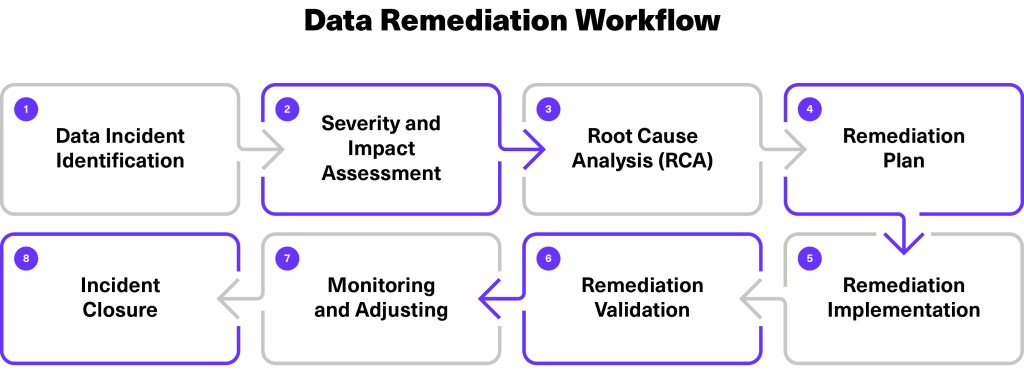
- Data incident identification
- Severity and impact assessment
- Root cause analysis (RCA)
- Remediation plan
- Remediation implementation
- Remediation validation
- Monitoring and adjusting
- Incident closure
Key Use Cases
Data Quality Management
Address data discrepancies and maintain data integrity across various datasets.
Compliance and Regulation
Ensure compliance with data protection regulations by rectifying data issues promptly.
Operational Efficiency
Streamline data remediation processes to improve operational efficiency and reduce downtime.
Data Remediation Overview
One common Data Quality issue is dealing with columns with empty or null values. For example, a date of birth field may be left empty if it’s not a required field in an online form.
Here’s how Lightup can help remediate recurring Data Quality issues like empty or null values through automation.
Detection and Alerting
Lightup performs checks to identify null or empty values, such as missing a date of birth or other anomalies within a dataset.
Upon detection, Lightup alerts stakeholders about the data incident, signaling the need for remediation.
Root Cause Analysis (RCA)
Once the missing data of birth values and other data incidents are confirmed, data teams initiate a root cause analysis process to understand why the issue occurred. This involves tracing the data flow upstream to pinpoint the origin of the problem, whether it’s in data ingestion, processing, or storage.
In our example of missing date of birth values, the root cause analysis indicated the issue occurred with an online form submission at the data ingestion stage.
Remediation Plan
Based on the RCA findings, data teams create a remediation plan divided into preventive measures and corrective actions.
To address missing date of birth values, organizations may enforce data validation rules for online forms or implement default values to prevent future occurrences.
Data Repair
In cases where data needs immediate fixing, Lightup supports data remediation by retrieving information from other sources or executing remediation scripts. This ensures that erroneous data is corrected in place, minimizing downstream impacts.
In the case of recurring missing date of birth values, Lightup can trigger a script to pull the date of birth from another system and insert it automatically, or insert dummy data if date of birth information is unavailable to avoid handling null values.
How It Works
In Lightup, the data remediation process begins by measuring the appropriate metrics and monitoring data on an ongoing basis to automatically detect unexpected anomalies, at scale — without setting manual thresholds (Figure 2).

1. Metric Definition and Training
Define Data Quality metrics in Lightup, specifying requirements such as field length or format. Lightup analyzes historically good data to train defined metrics in minutes, identifying patterns and anomalies to refine the remediation process.
2. Incident Detection
Using AI-powered anomaly detection algorithms, Lightup identifies data incidents and triggers alerts for further investigation.
3. Automated Remediation
Automate data fixes based on predefined rules and remediation logic, including bulk operations and simple remediation logic to ensure efficient and accurate data correction.
4. Validation and Monitoring
Validate and verify the effectiveness of remediation actions by monitoring remediated data in real time, adjusting processes as needed to maintain Data Quality standards.
Implementing Data Remediation
- Lightup shows you which metric failed and provides a Failed Records Query to surface failed records.
- Implement your remediation in a script with the failed records.
- The script will fix the problem and trigger the validate fix in Lightup, which must be successful before moving to the next step.

From Reactive to Proactive Data Remediation
With Lightup, data remediation goes from reactive to proactive and automated — with efficient end-to-end workflows, allowing enterprise organizations to uphold Data Quality standards at scale.

Resources
Questions? Contact us or request a free consultation and demo today.